A revenge on SkyeSpark! I kinda fell off the 3D modelling train after doing an art test for a job I was going for, but I’ve been playing about with Godot recently, and it sort of got me back in the mood to do some 3D modelling? So I made this 3D artfight revenge.

I pretty much followed the same process as for the Lilac model, but this character (Kye) has a much more detailed design, which was a fun challenge!
I think one of the learning points here is in using curves for hair (much easier than using planes!! can turn down the resolution, then convert to mesh and join to topology with some careful face-deletion and vertex-merging)
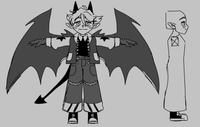
The 2D sketch I was working from when modelling - I’m surprised how comfortable I was working from mostly just a front view and extrapolating from that!
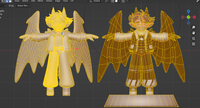
The blockout vs the final model’s wireframes
As far as retopology goes, I’m still very very slow at it! There’s a lot I’m not 100% on as well, like. Under the assumption that I want to make game art, does it make sense to split the model into a few different objects? eg. in this case I could maybe see it making sense to keep the wings/tail seperate? Ultimately everything except for the zippers and the base/pedestal is one object because I think that makes the most sense for a lower-poly style like this? But I have no idea what the standard is!!
My guess is it’d depend on the game/style I was working on… For BBB I’m pretty sure the hair was kept as a seperate object so it could be hidden when certain hats were worn I think? But I wasn’t involved in the 3D side of that game, just a lurker in the 3D channel, so I don’t know for sure!
Also if there’s a way to automatically retopologise lower-poly stuff that’d be great because I did try an automatic tool but it was more geared towards dealing with models that have highly-detailed sculpting I think ¯_(ツ)_/¯
I probably could’ve done with tidying up the edge loops on the arms a bit, but I was struggling with edge loops and BSurfaces so I think that’s something to look into improving with my next 3D project maybe!
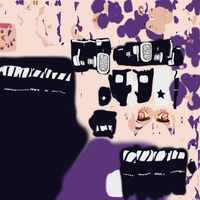
The model’s texture (my UV-unwrapping skills leave much to be desired…)
The other learning point is UVs… I need to spend just a bit more time getting the unwrapping right before I do any texturing in future!! Look at this mess it’s horrible!! I kind of did something like texture atlases in the end? (I think that’s what they’re called)
The UVs for all the plain black parts are in the black blob, and the same with plain white & plain purple UVs living in their own blobs. This was the best I could manage with the messy UVs I’d started texturing with… But in future I think it’s better to plan this sort of thing out more thouroughly before jumping right into texturing!!
This time I textured everything 100% in Blender’s texture paint tab! I think it went well? The thing I found the most helpful was utilising the colour palette tool. That way I wasn’t constantly interrupting myself by switching to the colour picker.
But yeah! As usual it was super cool to see my 2D skills feed into my 3D! I think as well as being visible in the textures a bit, you can see it in the way I stylised the character- my Shape Knowledge™ is surprisingly transferrable?